
A few things to do before your first cycle
These quick steps help ensure your SoClean 3+ runs smoothly—and delivers the results you expect.
- Why it matters: SoClean 3+ relies on distilled water to generate humidified ozone effectively. Using tap or low water levels can impact performance or trigger errors. The humidifier tank will need to be refilled approximately every 7 days.
- Guidance SoClean 3+ relies on distilled water to generate humidified ozone effectively. Using tap or low water levels can impact performance or trigger errors. The humidifier tank will need to be refilled approximately every 7 days.
- Why it matters: SoClean reduces bacteria by 99.9% on your hose and mask - but it doesn't replace the need for manual washing. It is important to remove residue from manufacturing or prior use before your first cycle.
- Guidance Give your hose and mask a thorough wash and let them fully dry before your first cycle.
- Why it matters: Proper airflow is essential for safe and effective operation. Blocking the fan can disrupt the cycle or reduce performance.
- Guidance Make sure the back and sides of the unit have space to breathe—avoid placing it against walls, bedding, or curtains.
- Why it matters: Unplugging your SoClean 3+ during an active cycle—or while trying to cancel one—interrupts operation and triggers a 2-hour reset state. During this time, the device will remain locked and cannot be opened.
- Guidance
- It’s okay to unplug your SoClean 3+ when it is NOT running a cycle (for example, if you need to move it).
- Never unplug to stop a cycle or clear an indicator light. This will trigger the 2-hour reset.
- To properly cancel a cycle, press and hold the Lid Open button for 5 seconds. The lid will unlock after approximately 15 minutes.
- If you see an indicator light (such as a red icon), refer to your user manual for the correct next step.
Set it up right. Sleep easier tonight.
A few simple steps now help ensure your SoClean 3+ delivers consistent, reliable performance—so your CPAP stays fresh and ready, every night.
Need Help?
Visit our FAQs or Support Center for step-by-step guidance, troubleshooting, and expert help.
Attention!
Pay over time with SoClean Easy Pay
Monthly payments made easy!

Shop now! Add your favorite SoClean products to your cart.
Choose SoClean Easy Pay as your payment method at checkout.

Pay over time. It's that easy!
One down payment today + 3 payments in the future.
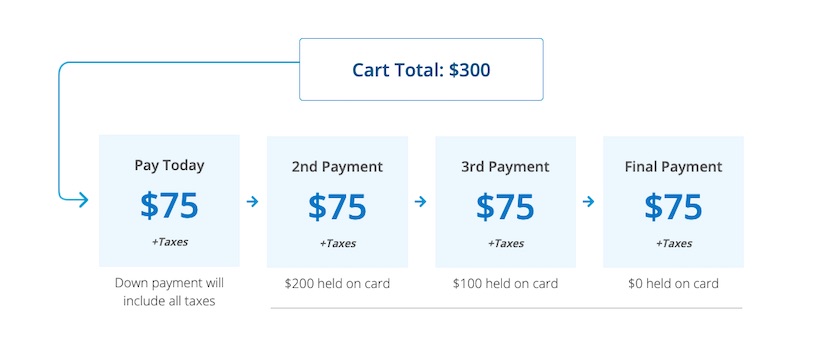
At the time of purchase, you will be charged a down payment equal to ¼ of your pre-tax cart total and any applicable sales tax. For the next three consecutive months, you will be charged an additional ¼ of your pre-tax cart total. See full terms and conditions for additional details.
Easy Pay will not charge you interest or fees. Other potential interest, fees and/or charges may apply from your card issuer.
To be eligible for SoClean Easy Pay, you must own a VISA or MasterCard, American Express, Discover, or JCB credit card.